NEWS
Whitepaper1

Choosing right SCADA

7+1 basic features

A very popular topic of “choosing SCADA”… What are the basic features of SCADA, pluses and minuses of different SCADA providers, what about the price versus future benefits? Are all SCADAs almost the same? What are the most common protocols your SCADA has to support? Answers to these questions and lots more here.


Download whitepaper

Create the Layouts in myDESIGNER

Easy and time saving

The layouts will help if you need to save time while creating the project. Once the layout (e.g. the Menu) is created, it could be used many times. In the video above is how to create it and use it in a few simple steps. Subscribe our YouTube channel and do not miss any of new videos.

Privacy policy

This privacy policy has been compiled to better serve those who are concerned with how their ‘Personally Identifiable Information’ (PII) is being used online. PII, as described in US privacy law and information security, is information that can be used on its own or with other information to identify, contact, or locate a single person, or to identify an individual in context. Please read our privacy policy carefully to get a clear understanding of how we collect, use, protect or otherwise handle your Personally Identifiable Information in accordance with our website.

Read More

Terms and conditions

Introduction and Acceptance of the Terms and Conditions

The general Terms and Conditions of Sale detailed below govern the contractual relationship between the ‘User’ (hereafter also referred to as ‘You’ or the ‘Customer’) and ‘mySCADA Technologies s.r.o.’ (hereafter also referred to as ‘We’ or the ‘Website’), belonging to the company mySCADA Technologies s.r.o., VAT no CZ28978650. Both parties accept these Conditions unreservedly. These General Conditions of Sale are the only conditions that are applicable and replace all other conditions, except in the case of express. written, prior dispensation. We maintain that, by confirming your order, you have read and do unreservedly accept our general Conditions of Sale. These Terms and Conditions of Sale are important to you and mySCADA Technologies s.r.o. as they are used to protect your rights as a valued customer and our rights as a business.

Read More

Work with effects

How to make a masterpiece of your visualization?

In myDESIGNER, there are many functions that revive the visualization and make it even more professional. The most popular features are rotation of the objects, moving and zooming, changing the opacity or colours of the objects. All of these effects assist in monitoring and controlling of the factory. Watch the video and do not forget to subscribe us on YouTube.

Master components in myDESIGNER

Advanced knowledge that saves time

In myDESIGNER, there are plenty of functions that can be used to create a specific visualization. Using the imagination and myDESIGNER together gives the opportunity to create a unique project very easily. Master components will help when small corrections are need (e.g. to change the component colour or replace the component). More detailed options are available in Getting started Manual in section Downloads here.

Creating custom components

Create once, use many times

This video will show how to create a new and custom component that fits for the specific project. In myDESIGNER, there is a possibility to build many categories and fill the categories with various components. When creating and extending the project, it saves time. Different shapes and colours with the combination of easy use, this myDESIGNER feature will help to create a unique project and it can also bring a little fun.

myREPORTS Export to MS Power BI

To reflect the requirements

mySCADA has connected with Microsoft Power BI to satisfied mySCADA clients. A lot of large businesses are accustomed to use Power BI software tool or they have to use it anyway. We believe that our interconnection with Power BI will help them in decision making and save their time and money. Watch the video and find out the simplicity in 2 minutes!

myREPORTS Getting Started

This video will show, how to load the data from your project (myPRO, myBOX or myMOBILE) to myREPORTS. In myREPORTS, you are able to monitor, control, compare or evaluate the outputs of the production, making graphs, charts for a different time interval (hour, day, month…) and also export the data to MS Excel or PDF with just one mouse clicks. Watch the video, download myREPORTS for free here and enjoy the power of this SMART decision making tool! Subscribe us on YouTube!

Set/Write commands

How to set an Open or a Toggle Command?

Watch this video and find out how easy the project creating could be. For more videos about mySCADA products click here and subscribe us!

Active Areas – part 1

How to simply create an active area?

Active areas are the regions in views where you can show dynamic content. It can be another view, trend, alarm window, data-log or even external HTML page or a live video stream.  Active area acts as an active container for all those multiple options. For more videos about mySCADA products click here and subscribe us!


Customize look

How to customize the appearance of the project?

Do you want to adapt your project to the corporate colors? It has never been so easy to customize the visualization according to your wishes. Watch this short video and see for yourself. For more videos about mySCADA products click here and subscribe us!

Hydropower Plant Control

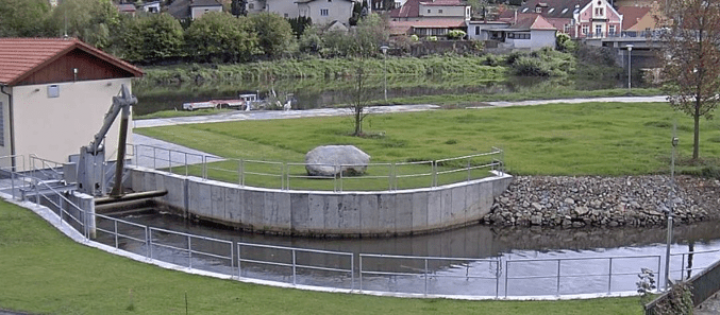
Czech company HydroCon Inc. has rebuilt small hydropower plant (SHPP) in Czech city Hluboká nad Vltavou, which was completely modernized in 2014 with a strong emphasis on the latest technology that allows remote management and effective control of the data. The supplier of the technology was the international engineering and manufacturing company Mavel a.s. that provides hyd

Read More

Traffic Control

Husovicky Tunnel in Brno, Czech Republic Husovicky tunnel was built in 1999 with the objective to ease traffic congestion between the east and north districts of the city Brno in Czech Republic. It is approximately 600 meters (0.4 miles) long. Thousands of cars pass through every day. In order to enhance the safety in the tunnel and make the tunnel maintenance more efficient the previous obsolete automation system monitoring traffic signs, lights and ventilation was replaced by a new automation technology in 2012.

Read More

Wastewater Treatment

The communities of Hrádek nad Nisou (Czech Republic) and Bogatynia (Poland) invested in extensive upgrade of the local water treatment facility including new automation and control system to process more sewage and gray water effectively and reliably. The new control system was equipped with MicroLogix 1400 PLC made by Allen-Bradley. The challenge was to find a reliable SCADA system

Read More

Raw Water Treatment

ŠKO-ENERGO is an operating company established in 1995 that supplies energy and broad range of services such as raw water treatment and waste liquidation for the company ŠKODA AUTO, a.s. ŠKO-ENERGO is also a supplier of heat for 12 000 homes and more than 200 business entities and institutions in the city of Mladá Boleslav in Czech Republic.

Read More

Production Line Control

Niagara Bottling LLC in the largest family owned and operated bottled water company in the United States with geographically diversified production facilities. As a producer and supplier of Niagara brand and private label bottled water to many of the nation’s leading grocery retailers, Niagara has built the business on 45 years of offering unmatched quality, price, and service for its customers.

Read More